Organization API Keys
Global API keys let you automate Zenifra operations without using a user's personal session. Each key belongs to an organization, records who created it, respects RBAC, and can be restricted by source IP.
Use this feature for CI/CD, internal scripts, operational jobs, and server-side integrations.
Create an API key
In the organization console:
- open API keys in the sidebar;
- click Create API key;
- enter a descriptive name;
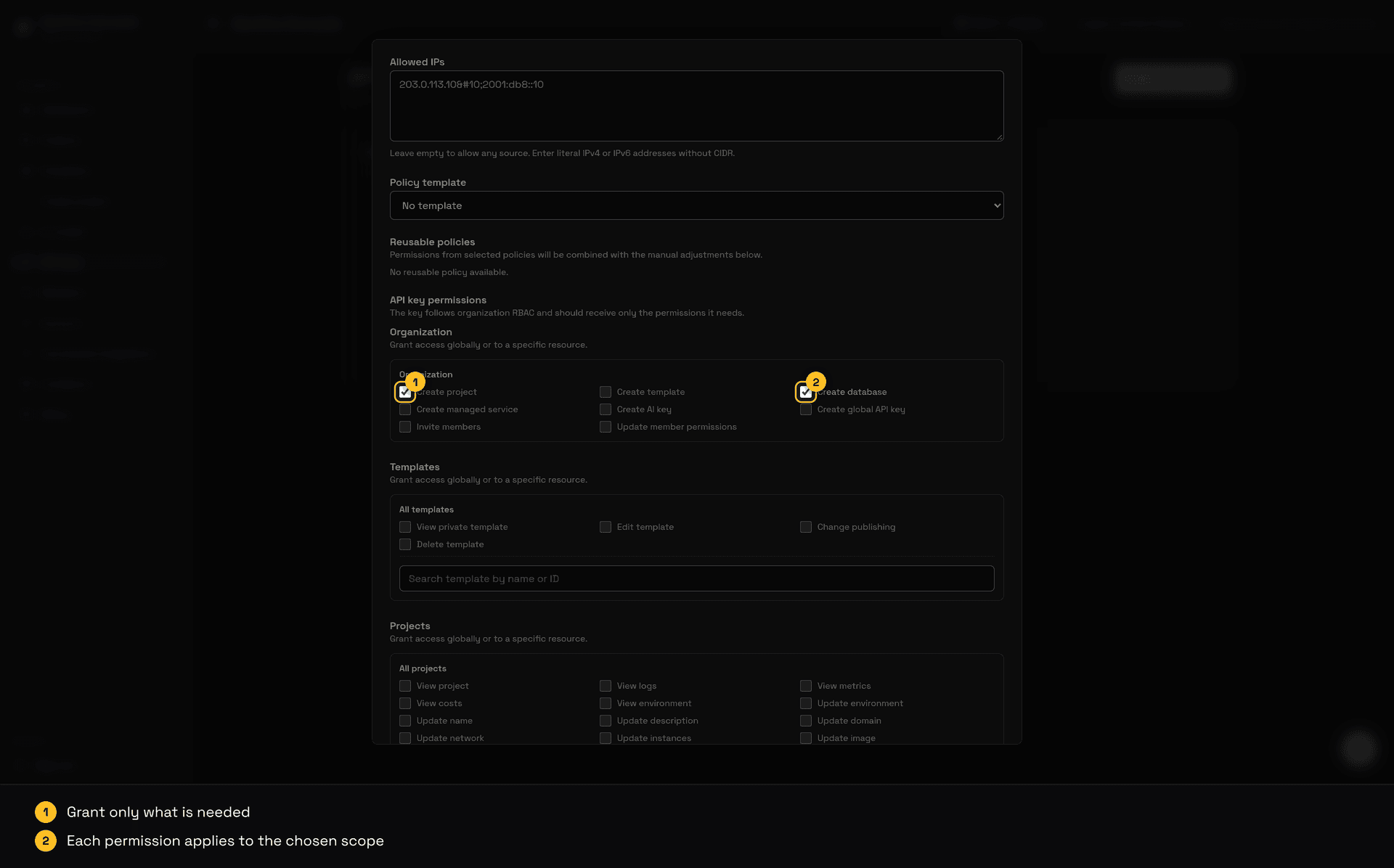
- choose the required permissions, starting from a policy template, reusable policies, or manual adjustments;
- choose the expiration (30, 60, 90 days, 1 year, a custom date or no expiration; the default is 90 days) and, optionally, the allowed IPs;
- copy the key shown after creation.
Video: filling in an organization API key and an AI key.
The full key is shown only once. After that, the console shows only metadata, such as status, creator, last access, last IP, and expiration, plus a partial key preview.
You can only grant an API Key permissions you already hold in the organization. Creating keys requires api_key.create on organization:*; the owner already has this access.
Edit an API key
In the key list, use Edit to change the name, expiration and allowed IPs of an active or expired key. Setting a new future date on an expired key makes it usable again. Permissions cannot be edited: to change the scope, create a new key and revoke the old one.
Editing requires api_key.update on the key (or on api_key:*); the owner already has this access. Revoked keys cannot be edited.
Through the API:
curl -X PATCH https://api.zenifra.com/v1/organizations/<organization-id>/api-keys/<api-key-id> \
  -H "Authorization: Bearer znf_your_key" \
  -H "Content-Type: application/json" \
  -d '{"expires_at": "2027-01-31T23:59:00.000Z"}'
The body accepts name, allowed_ips and expires_at (a future date, or null to remove the expiration).
Expiration notice
When a key is 30 days from expiring, Zenifra emails the key creator and the organization owner with the key name, preview and expiration date. To keep your automation running, extend the expiration by editing the key or rotate it.
Use in HTTP requests
Send the API key in an authentication header:
curl https://api.zenifra.com/v1/project \
  -H "Authorization: Bearer znf_your_key"
This header is also accepted:
curl https://api.zenifra.com/v1/project \
  -H "x-api-key: znf_your_key"
Prefer Authorization: Bearer for compatibility with the CLI and common HTTP tools.
Use with the CLI
In automations, use an environment variable:
export ZENIFRA_API_KEY=znf_your_key
zenifra projects --type http --page 1 --limit 15
zenifra deploy --project <project-id> --branch main
To save it locally:
zenifra auth api-key --key znf_your_keyBecause the API key is already linked to an organization, automation commands do not need org set. Personal commands, such as listing organizations, still require user login.
Permissions and scope
The API key uses the same organization permission model. Grant only what the automation needs.
Examples:
- deploy a specific project;
- read logs and metrics;
- create projects from a pipeline;
- inspect builds;
- rotate controlled operational resources.
If a key leaks, the impact is limited by the granted permissions and allowed IPs.
Complete scope catalog
The permissions.resources field accepts the scopes below. Use * only when the automation truly needs every resource of that type; for least privilege, provide the ID of the matching organization, project, database, service, or key.
Projects and Previews
| Scope | Use |
|---|---|
project.create | Create HTTP applications and scheduled Jobs, including from templates. Use on organization:*. |
project.read | Read a specific project. |
project.logs.read | Read logs, builds, and Job execution logs. |
project.metrics.read | Read metrics, capacity, and operational usage. |
project.billing.read | Read project or Preview usage and costs. |
project.env.read | Read environment variables without exposing the key. |
project.env.update | Update environment variables. |
project.name.update | Change a project name. |
project.description.update | Change a project description. |
project.domain.update | Change exposure, domain, and custom domains. |
project.network.update | Change network access rules. |
project.instances.update | Change instances, auto-scaling, health check, and alerts. |
project.image.update | Change the published image. |
project.source.update | Read or change the code integration. |
project.schedule.update | Change the schedule of a scheduled Job. |
project.job-run.cancel | Cancel a running execution of a scheduled Job. |
project.deploy.trigger | Trigger a publication. |
project.stop | Stop a project. |
project.resume | Resume a project. |
project.plan.update | Change plan or automatic renewal. |
project.storage.update | Change storage size. |
project.delete | Remove a project. |
project.preview.read | Read Preview plans and list. Reading Preview settings requires a user session. |
project.preview.configure | Enable or change Preview settings; requires an authorized user. |
project.preview.deploy | Create or update a Preview and follow its operation. |
project.preview.delete | Remove a Preview. |
Templates
| Scope | Use |
|---|---|
template.create | Create a private template. Use on organization:*. |
template.read | Read an authorized template. |
template.update | Edit an authorized template. |
template.publish | Publish or make a template private. |
template.delete | Remove a template. |
Databases
| Scope | Use |
|---|---|
database.create | Create PostgreSQL, MariaDB, or ClickHouse (Analytics). Use on organization:*. |
database.status.read | Read a database state. |
database.connection.read | Read authorized connection data. |
database.password.rotate | Request a password rotation. |
database.version.update | Update the database version. |
Managed services
| Scope | Use |
|---|---|
managed_service.create | Create Valkey services with the Key-Value, Cache, or Queue profile. Use on organization:*. |
managed_service.read | Not currently exposed to organization API Keys. |
managed_service.status.read | Read a service state. |
managed_service.connection.read | Read connection data without credentials. |
managed_service.credentials.rotate | Request credential rotation. |
managed_service.version.update | Not currently exposed to organization API Keys. |
managed_service.metrics.read | Not currently exposed to organization API Keys. |
managed_service.lifecycle.update | Not currently exposed to organization API Keys. |
managed_service.delete | Not currently exposed to organization API Keys. |
AI
| Scope | Use |
|---|---|
ai_key.create | Create an AI key. Use on organization:*. |
ai_key.read | Read an authorized AI key. |
ai_key.update | Change an AI key budget. |
ai_key.delete | Remove an AI key. |
ai_usage.read | Read AI usage and costs; it can be limited to one AI key ID. |
Organization API keys
| Scope | Use |
|---|---|
api_key.create | Create an organization API key. Use on organization:*. |
api_key.read | Read authorized API keys. |
api_key.update | Edit the name, expiration and allowed IPs of an authorized API key. |
api_key.delete | Revoke an authorized API key. |
Billing
| Scope | Use |
|---|---|
billing.read | Read the organization's payment configuration. |
billing.payment.configure | Configure or start linking a payment method. |
billing.transactions.read | Read organization transactions. |
billing.checkout.create | Create checkout in an authorized integration. |
Organization administration
| Scope | Use |
|---|---|
member.invite | Invite a member. User session only; does not work with an API Key. |
member.permissions.update | Change member permissions and policies. User session only; does not work with an API Key. |
Member, invitation, and policy administration, as well as personal actions such as listing organizations, accepting invitations, or changing account data, require a user session.
Minimum key for operating a Preview
After an authorized user enables Preview on the primary project, an automation that only needs to create/update, read, and remove a Preview should receive only these grants on the primary project:
{
  "resources": {
    "project": {
      "<project-id>": [
        "project.read",
        "project.preview.read",
        "project.preview.deploy",
        "project.preview.delete"
      ]
    }
  }
}
project.preview.configure is not required for the operational lifecycle and should not be granted to automation when initial configuration is performed by a user. To read Preview costs, add project.billing.read separately.
Minimum requirement per operation
Each scope below is limited to the same project-id of the primary project:
| Operation | Minimum scope | Resource ID |
|---|---|---|
| Read the primary project | project.read | project:<project-id> |
| Read Preview plans and list | project.preview.read | project:<project-id> |
| Create or update a Preview and read its operation | project.preview.deploy | project:<project-id> |
| Read Preview details | project.preview.deploy | project:<project-id> |
| Remove a Preview | project.preview.delete | project:<project-id> |
| Read Preview costs | project.billing.read | project:<project-id>; optional |
Therefore, automation running the complete lifecycle needs exactly the four scopes in the previous example. Do not add project.preview.configure: initial configuration remains a user-authorized operation.
IP allowlists
When creating the key, enter fixed IPs that may call the API. When the list is not empty, requests from other IPs are rejected.
Use IP allowlists when automation runs on:
- self-hosted runners;
- internal servers;
- corporate NAT;
- jobs with a known egress IP.
The field accepts literal IPv4 and IPv6 addresses. CIDR is not accepted.
Revocation and rotation
Revoke a key when:
- it is no longer used;
- its owner left the team (when a member is removed from the organization, the API Keys they created are revoked automatically);
- the source IP changed;
- a leak is suspected;
- the permissions became too broad.
For safe rotation, create a new key, update the automation, validate usage, and revoke the old key.
Next steps
Last updated on
Granular Permissions in Organizations
Configure permissions by member, resource, and action, directly or with reusable policies, to protect projects, databases, billing, Git sources, AI keys, and global API keys.
Security, privacy, and reliability
Zenifra security practices for organizations, permissions, secrets, API keys, databases, logs, LGPD, and operations.