Database
Zenifra offers managed databases with PostgreSQL, MariaDB, and Valkey Key‑Value for teams that want to operate applications without manually managing database infrastructure.
Required permissions
| Action | Minimum scope |
|---|---|
| Create PostgreSQL or MariaDB | database.create on organization:* |
| Create Valkey key-value storage | managed_service.create on organization:* |
| Read a project | project.read on project:<project-id> |
| Read status or connection | database.status.read or database.connection.read on database:<project-id> |
| Read metrics | project.metrics.read on project:<project-id> |
An owner has full access in a user session. assistant, member, and organization API Keys need the specific grants.
Supported databases
| Database | Supported versions |
|---|---|
| PostgreSQL | 15, 16, 17, 18 |
| MariaDB | 10, 11 |
| Valkey Key‑Value | 9.1.1 |
| ClickHouse (Analytics) | 26.8.6.5 — see the Analytics section |
Valkey Key‑Value
Use this product for sessions, shared state, counters, locks, and atomic operations. It is durable, uses db-* plans, and is not a relational database: ad hoc queries, joins, and reports belong in the appropriate system. The connection uses VALKEY_URL, the default user, TLS, and a password revealed once during creation or rotation.
See the complete Key‑Value Database with Valkey guide and the shared connection guide.
What the platform provides
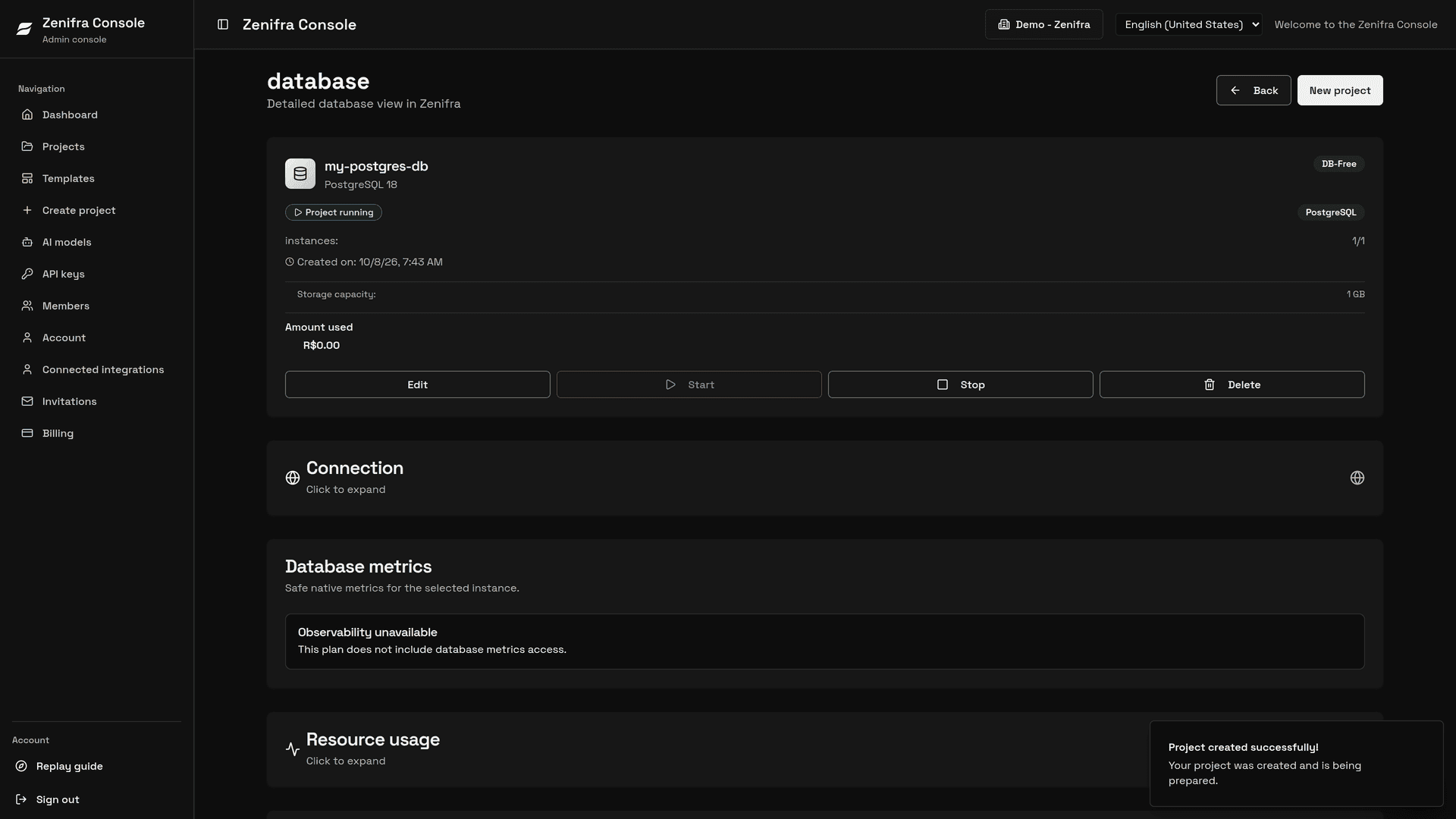
Video: creating a PostgreSQL database on the DB-Free plan, from the form to the running database page.
- replication according to each engine's supported topology
- automatic failover when there is more than one instance (PostgreSQL with 2 or 3 instances; MariaDB always)
- a platform-generated password, shown only at creation or after a rotation
- host, port, username, database, and connection URI in the console
- mandatory TLS for connections
- persistent storage
For Key‑Value, the console shows hostname, port, default username, TLS, and a valkeys:// URI; the full password is not returned by the masked connection read.
Connection details
In the console, you can see:
- host, in the format
postgresql-<project-id>.managed.zenifra.comormariadb-<project-id>.managed.zenifra.com - port
- username
app - database name
app - a ready-to-copy connection URI
The password is generated by the platform and shown only once: on the creation completion screen or after a password rotation. Later reads show the URI with a masked password. If you lose the password, generate a new one in the project edit page.
Note: the port is assigned by the platform. Copy the values from the console instead of treating them as fixed.
For PostgreSQL with 2 or 3 instances, the console also shows a read-only URI that routes queries to the replicas. For MariaDB, the provided connection points to the primary instance.
How to connect your application
Zenifra does not automatically inject DATABASE_URL into your HTTP project.
The correct flow is:
- copy the URI or connection details from the console
- manually configure
DATABASE_URLin the HTTP project
PostgreSQL with psql
The PostgreSQL URI provided by the console uses sslmode=verify-full&sslrootcert=system. This requires TLS, validates the certificate chain against the system trust store, and confirms that the hostname matches the certificate.
With a modern psql version, you can copy the full URI as provided. Older clients that do not support sslrootcert=system must set sslrootcert to a trusted CA bundle, for example:
psql "postgresql://app:[REDACTED]@<host>:<port>/app?sslmode=verify-full&sslrootcert=/etc/ssl/certs/ca-certificates.crt"Do not replace verify-full with require, disable, or any option that stops validating the certificate or hostname. Do not use the IP address instead of the host shown in the console.
PostgreSQL
- can operate from 1 to 3 total instances (the
db-freeplan always uses 1 instance) - with 1 instance, only the primary instance exists
- with multiple instances, the primary handles writes and reads
- extra instances act as read replicas
- in hourly billing, the instance count can be increased or decreased later
- in monthly and yearly billing, the instance count is fixed in the contract
MariaDB
- always runs with 3 instances: one primary and two replicas
- does not allow increasing or decreasing the instance count
- is not available on the
db-freeplan; it starts atdb-starter
Database version
At creation time, the user can select any version available in the console.
During edit:
- only forward upgrades are supported
- downgrades are not supported
Warning: version upgrades can cause a few minutes of downtime. Make this change during a low-traffic window.
Storage
Every database on Zenifra uses persistent storage.
Storage rules
- storage can increase
- storage can never shrink
- changes are only available in hourly billing; on monthly and yearly contracts, capacity is fixed for the contract term
- on the
db-freeplan, storage is fixed at 1 GB - increasing storage may cause temporary downtime
Failover and replication
PostgreSQL and MariaDB support automatic failover when replicas exist: if the primary instance fails, a replica can be promoted. For PostgreSQL this requires 2 or 3 instances; with 1 instance there is no replica to take over. MariaDB always runs with 3 instances.
During a failover, open connections can be closed. Configure your application to reconnect and retry idempotent operations.
Backups
Zenifra does not currently provide automatic backups, console restore, or point-in-time recovery for PostgreSQL and MariaDB. Replicas protect against instance failure, not against accidental deletion or data corrupted by the application.
Keep your own export routine, for example with pg_dump (PostgreSQL) or mariadb-dump/mysqldump (MariaDB), store the copies outside the project, and test restores periodically.
User access
The user does not have root or superuser access, but does have enough elevated access for normal database usage.
Metrics
PostgreSQL and MariaDB metrics are available on the db-premium and db-enterprise plans. They are shown per instance as a snapshot refreshed every 60 seconds, without history:
- resources: CPU, memory, and storage usage/capacity
- connections
- activity (transactions or queries)
- read cache
- database size
- locks and deadlocks
- average latency and slow operations
- health and replication
See the PostgreSQL metrics and MariaDB metrics guides.
Next steps
Last updated on