OCI image deployment
Use OCI images when your application is already packaged outside Zenifra. This flow is recommended for CI pipelines that build the image, publish it to a registry, and promote versions by tag.
When to choose OCI
Choose OCI when:
- your team already uses Docker in production
- the image is generated by GitHub Actions, GitLab CI, Jenkins, or another pipeline
- you want to promote specific tags between environments
- build steps should not run inside Zenifra
- the application must keep the same artifact across platforms
For projects that evolve directly from source code, see GitHub Deployment.
Image requirements
The image must:
- expose a long-running HTTP process
- listen on
0.0.0.0 - use the port configured in the Zenifra project
- receive configuration through environment variables
- start without depending on local files outside the image or configured volume
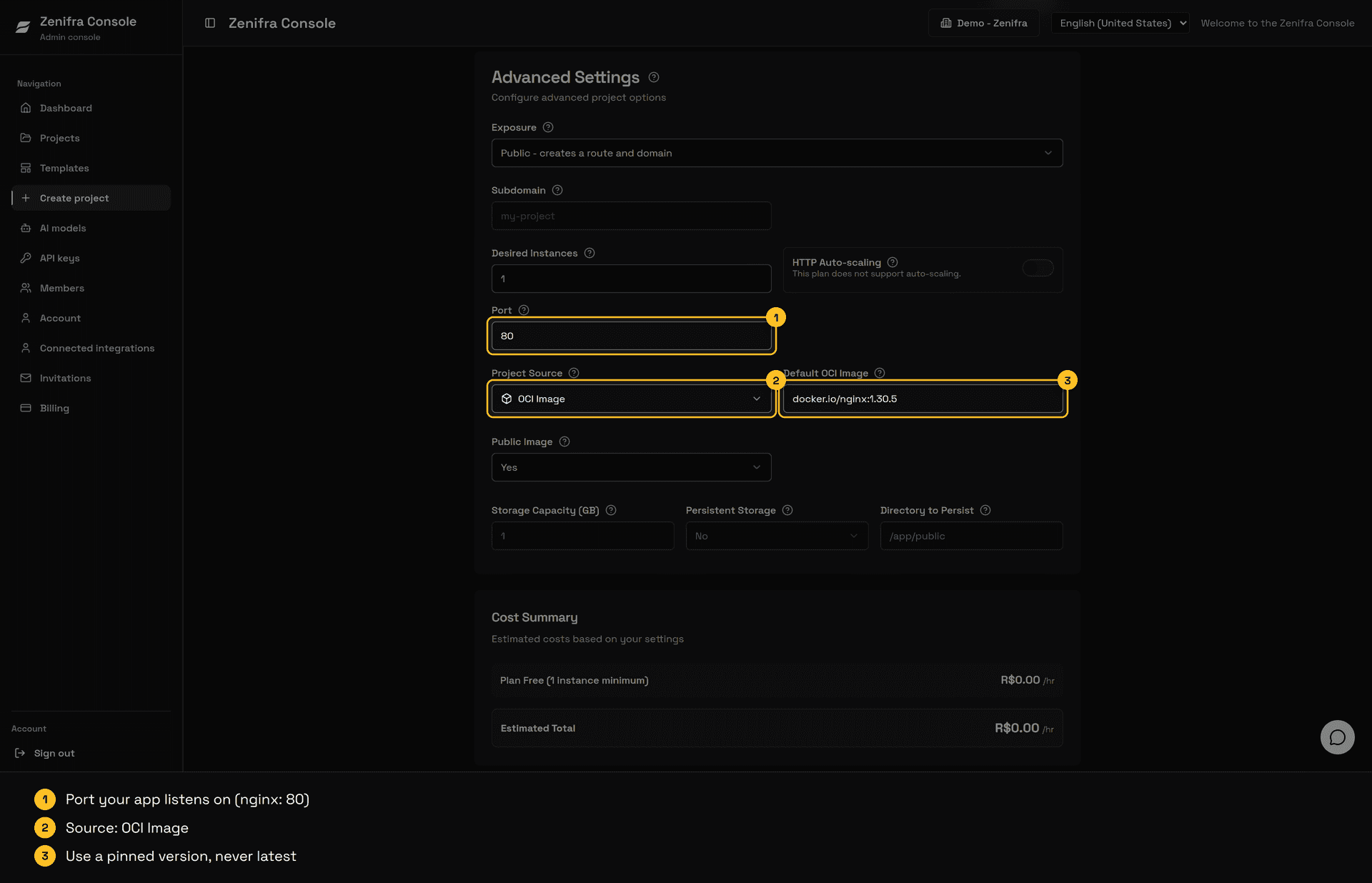
Avoid generic tags like latest in production. Prefer tags such as 1.4.2, 2026-05-16, or the commit SHA.
Official images work without changes, including those that run as root and listen on low ports such as 80. For NGINX, for example:
docker.io/nginx:alpineIn that case, set the project port to 80, the port exposed by the image, unless you have customized the container configuration.
Create the project
In the console:
- click Create Project
- choose OCI Image as source
- enter the image, for example
ghcr.io/acme/api:1.4.2 - select whether the image is public or private
- configure the application port
- add environment variables
- choose plan, instances, and storage
- create the project and follow the logs
Update the image
To publish a new version:
- generate a new image in your pipeline
- publish the tag to the registry
- change the project image in the console
- validate logs, metrics, and public URL
If the image is private, keep the same authentication type defined during creation. For details, see Private registry.
Validation
After publication, confirm:
- the
*.clients.zenifra.comURL responds - the
/healthroute returns success, if it exists - logs do not show startup errors
- CPU, RAM, storage, and HTTP requests appear according to plan
DATABASE_URLand other variables were manually configured
Next steps
FAQ
Can I convert an OCI project to GitHub later?
A project created with OCI source remains an OCI project; this conversion is not part of the normal flow.
Can I use a private image?
Yes. The current documentation covers authentication through AWS ECR or registry user and token/password.
Should I use latest?
Avoid it in production. Immutable tags make rollback, audit, and support more predictable.
My image runs as root or listens on port 80. Does it work?
Yes. Images that run as root and listen on low ports, such as docker.io/nginx:alpine on port 80, work normally. Just set the project Port field to the port exposed by the image.
Last updated on