Templates in Zenifra
Templates are reusable starting points for HTTP applications. A template brings together an application, its port, a persistent data path when applicable, expected variables, and an initial capacity configuration. An organization can turn a validated setup into a new deployment without repeating every decision from scratch.
The catalog includes Templates for common everyday applications such as n8n, Metabase, and WordPress, along with other options published by Zenifra, official partners, and the community. When all required information is already prepared, simply select Deploy and confirm: Zenifra creates a ready and functional application with one click.
The feature is available through Templates in the console menu. A personal account uses its personal organization; business accounts can switch organizations before viewing or creating resources.
What the catalog shows
Video: choosing and customizing the n8n template.
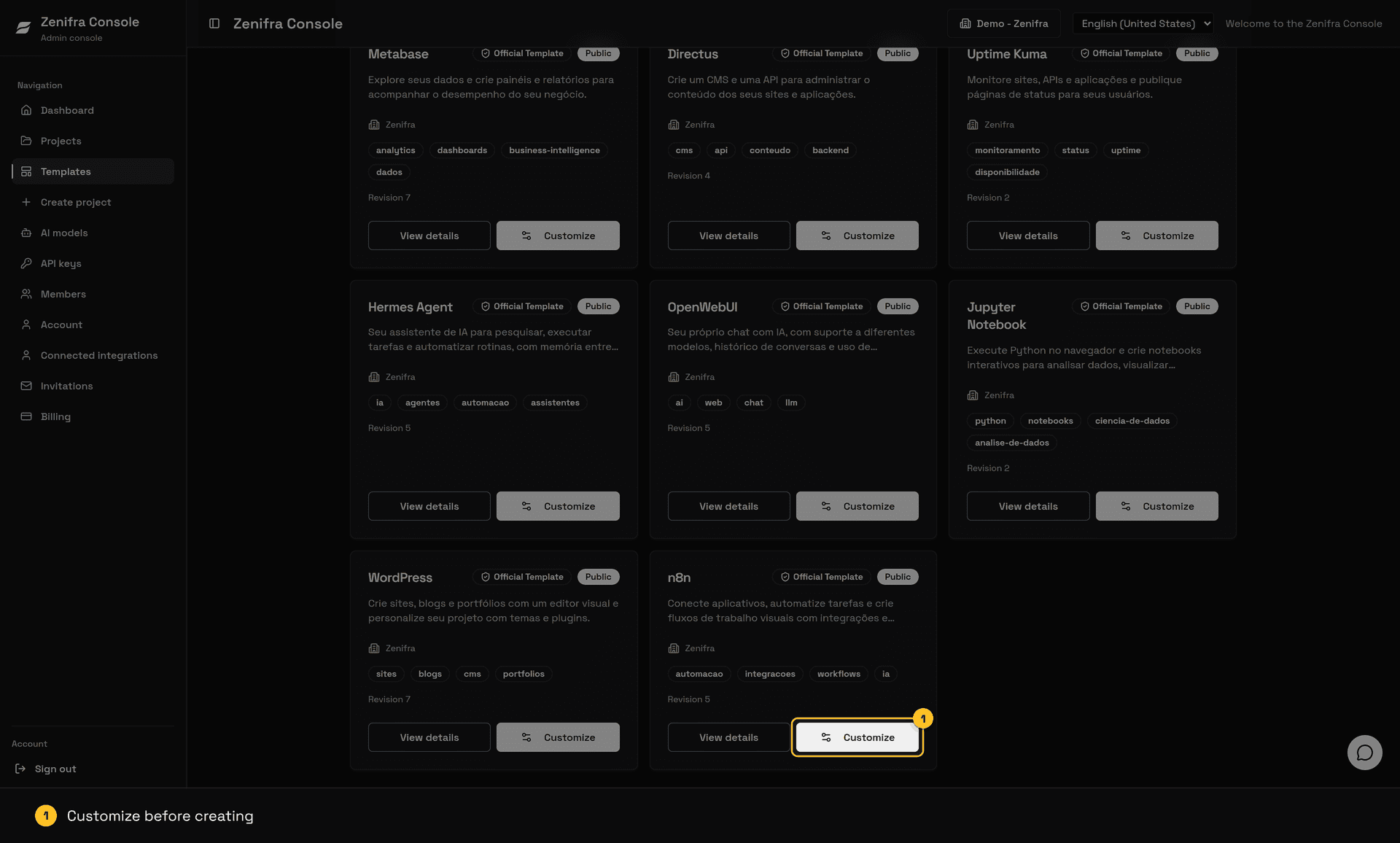
The catalog has two areas:
- Organization templates: public and private templates belonging to the active organization, sorted by update time;
- Public templates: templates published by Zenifra organizations, with Newest, Most used, and Official views.
Each card shows the name, summary, author organization, tags, revision, visibility, and usage. In the console, public browsing requires an authenticated session but does not require project-creation permission. This lets someone learn about the available options before requesting access to deploy. The summary list of public templates (name, summary, description, tags, author organization, official badge, and whether the application uses a database) is also available without authentication at GET https://api.zenifra.com/v1/public/templates.
Public templates do not expose the original project or the author organization's data. The catalog shares only the information prepared by the author. Each deployment creates a separate project in the consumer organization.
Official Templates
The Official Template badge identifies Templates published by Zenifra or by partner organizations recognized by the platform. The classification belongs to the author organization and automatically appears on its Templates. Use Official in the public catalog to browse only these publishers.
The badge identifies the Template's official source, but it does not replace reviewing settings, variables, capacity, and billing for your project.
What a template defines
The author configures a public application reference, the HTTP port, the persistent path, and the variables that a new project must provide. The author also defines suggestions for plan, billing, exposure, instance count, persistence, capacity, and auto-scaling.
These suggestions make the first deployment easier but remain editable during deployment. The project name, description, plan, billing mode, exposure, capacity, persistence, and scaling belong to the new project. A later template change does not alter projects that have already been created.
Templates support HTTP applications based on public references from the registries supported by Zenifra. An author can optionally declare that the application needs a database, select compatible engines from the catalog, recommend a configuration for each one, and bind declared variables to connection details. Zenifra creates the selected database and application together when the consumer chooses that option.
The database remains an independent project after creation. Removing either resource does not remove the other, and changing a database password does not automatically change the application's variables. Importing an existing database and private images remain outside this flow.
Security and revisions
Every template starts private. The author can review its content and publish it when ready. Secret variables never receive default values, and sensitive values are entered only in the deployment form. Database bindings store only the variable name and the type of connection detail to use; they never store a connection value. Do not put tokens, passwords, or keys in descriptions, tags, application references, or examples.
Each content change creates a new revision. The console and API confirm the selected revision before updating or deploying. This prevents someone from unknowingly publishing an old configuration. If a template is removed or becomes unavailable, a new deployment is rejected; existing projects remain independent.
Next steps
- Create and publish a template
- Deploy an application from a template
- Understand organizations and permissions
- Read the Templates API reference
- Open the catalog in the console
FAQ
Which applications can I find in the catalog?
The catalog includes Templates such as n8n, Metabase, and WordPress, along with other useful everyday applications. New Templates can be published by Zenifra, official partners, and other organizations.
Can every Template be deployed with one click?
One-click deployment is available when the Template already contains all required information. If the application needs a secret or another required value that cannot be suggested, use Customize to provide it before creating the project.
Can a Template create a database too?
Yes. When an author declares a database dependency (PostgreSQL, MariaDB, or ClickHouse), the Customize page offers to create a compatible database with the application. A template can declare up to 5 databases, for example PostgreSQL for application data and ClickHouse Analytics for reports, and all of them are created in the same operation. Quick deployment through Deploy creates only the application. The author's recommended engine and configuration are preselected, but the consumer can select another compatible option. Connection variables declared by the author are filled automatically and sensitive values stay masked.
Do templates update projects automatically?
No. The project keeps the revision used at deployment time and follows its own lifecycle.
Can I use a template without project-creation permission?
Yes. People without project.create can browse the catalog, view accessible templates, and read details. Deployment remains unavailable until the organization grants the required permission.
Can a private template be shared with another organization?
No. To appear for other organizations, a template must be published. Publishing does not expose private data or grant administrative access to the author organization.
Last updated on
Runtimes
Learn which Node.js, Python, Bun, Go, Java, and PHP runtimes are available for Zenifra Git projects and how dependency install, builds, and startup work.
Create and publish a template
Learn how to prepare an HTTP application, declare variables, and publish a template for your organization or the public Zenifra catalog.